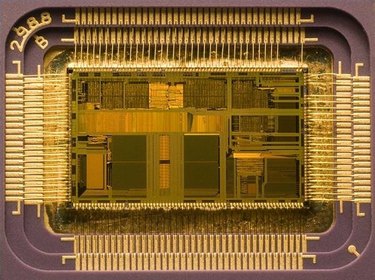
Since the creation of electric computers, there has been a need for a central processing unit to control the actions and data flow in the machines. Early methods of computer processors were large and inefficient. The modern microprocessor is the most widely-used method of controlling a computer. While there are only two major companies manufacturing processors left in the industry, some engineers and technicians are working to replace the silicon-based chip with other formats.
Benefits
Video of the Day
A computer processor is the part of a computer that analyzes, controls and disperses data. Commonly referred to as the central processing unit or CPU, a computer processor acts as the brains of the computer, telling which program and application to do what at a specific time and interval. Modern computer processors operate with speeds of 2.6 to 3.66 gigahertz. The most advanced models are even faster. It takes the form of a small microchip that fits into a series of sockets in the motherboard. The more powerful the computer processor is on the computer, the faster and more efficient the machine will run.
Video of the Day
Types
Modern processors are designed by two distinct companies: Intel and Advanced Micro Devices (AMD). Intel processors are most commonly used in prefabricated computer systems, such as those from Dell and HP. The company focuses on two different lines of processors: the Pentium and the Celeron. Pentium processors are the larger microchip style that works on most desktop and some laptops. They can handle high-demand processing, such as that found in 3D gaming, video editing and other multimedia-intense applications. Celeron processors are more compact models with the ability to run a basic computer efficiently and cost-effectively. AMD's line of computer processors can be found in prefabricated models, however, are most commonplace with home-built systems or specially designed machines. AMD was the first to build a 64-bit processor, capable of high-end applications use with graphic intensive operations. The previous industry standard had been 32-bit processing. Some AMD processors offer built-in virus protection.
Considerations
Other lines of processors are used in older models of computers. Macintosh computers specifically used its own line for many years between 1984 and 2006. The company switched to Intel processors in all its new machines after this period. During the early years of Apple Computers, 1984 to 1996, the company used Motorola branded computer processors to handle its operating systems and data flow. These were known as the 68000 series and featured processors with speeds between 16 and 33 megahertz. Following 1996, Apple used IBM-designed processors in nearly all of its machines. These ranged in speeds between 66 megahertz to 2.5 gigahertz by 2006.
History
The earliest forms of computer processors were designed from vacuum tubes and electrical relays. By the 1950s, these had been replaced by the advent of the transistor. These transistors were built onto printed circuit boards, copper that is etched onto a non-electrical board, and various components were added. These computer processors were large and bulky, sometimes taking up whole rooms. During the construction of the Apollo guidance computer for NASA, scientists were able construct integrated circuits that allowed large numbers of transistors to be manufactured into a single semiconductor. This was found to be more reliable that previous models and much more compact. The microprocessor was invented by Intel in 1970. The 4004 was as fast as its larger cousins, but could be used in much smaller devices. With the advent of the personal computer, the majority of processor technology uses the microprocessor model.
Potential
Engineers and technicians routinely reach a point in processor design in which they face limits in making the device faster. They have been challenged by size and materials. At one time, designers believed they could not get passed the 1 gigahertz speed level, that was accomplished by the AMD Athlon in 2000. The 64-bit barrier was broken by the same company in 2003. Processors have since become duo-core and quad-core, meaning they are capable of executing nearly twice as much data transfers and flow as with a single-core. Many motherboards are now coming equipped for two or more processors to work in unison. The most advanced research being accomplished is that which uses new technologies to expand the speed and capability of the processor. IBM has designed computer processor technology using lasers, much like fiberoptics. The Georgia Institute of Technology has developed biological computer processors using the brain cells of leeches. Other scientists are developing ways to pass data along gaseous phenomena.