The History of Computer Monitors

The History of Computer Monitors thumbnail
The History of Computer Monitors

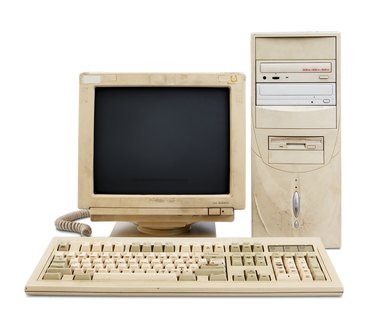
Today's monitors have a long history, spanning from the first personal computer to today's big-screen LCD. Along the way, innovations enabled growth of PCs as well as industries, such as computer gaming. Current LCD computer monitors now outnumber the original CRT screen. Screens now displaying millions of colors for complex graphics began with just two for basic text.

  1. Early Days

    • The video display terminal, or VDT, marked the early days of computer monitors. These VDTs included a screen and attached keyboard linked to a larger computer by a serial connection. Because VDTs required a connection to a larger computer, they were often referred to as "dumb terminals." Dumb terminals displayed text only in two colors, usually black and green. The Apple II and first game machines began using a television CRT.

    IBM's CRT

    • In 1981, IBM introduced the first PC, also known as a "three-piece computer" because the monitor, keyboard and cpu were separate, rather than earlier computer terminals, which combined the monitor and keyboard. With the PC's introduction came the Color Graphics Adapter (CGA) from IBM, allowing for four colors. The CGA allowed 320 x 200 resolution. By 1984, IBM introduced the Enhanced Graphics Adapter permitting 16 colors and a 640 x 350-pixel display.

    VGA

    • By 1987 IBM began offering the Video Graphics Array as part of its new PS/2 computer system. The display technology allowed for 256 different colors and 640 x 480 resolution. Despite the appearance of newer display techniques, VGA has become a computer monitor standard. Indeed, the VGA may have become the impetus for the modern computer gaming industry as the increased color palette made graphics possible. Up to this point, computer displays were limited to text.

    XGA and UXGA

    • In 1990 computer display capability took a quantum leap with the Enhanced Graphics Array, or XGA. XGA permitted 16.8 million colors (with 800 x 600 resolution), offering "true color" that compared to human sight. The human eye can detect 10 million different colors. Current computer displays used Ultra Extended Graphics Array, or UXGA. UXGA (1600 x 1200 resolution) is commonly used in 21-inch and 22-inch CRTs and LCD monitors.

    LCDs

    • LCD Displays Appeared in the 1990s

      Although the CRT dominated computer monitor sales since 1980, the rise of Liquid Crystal Displays (LCDs) has nearly eclipsed the venerable CRT. More than 20 years after RCA first experimented with LCDs in 1968, the price of new monitors has fallen while size increased. First developed for calculators and other small device displays, LCDs now measure 21-inches or more. In 1990 the popularity of LCD computer displays began. By 1997 LCD monitors were competing with CRTs

Related Searches:

References

  • Photo Credit http://www.flickr.com/photos/22280677@N07/2264355654/,http://www.flickr.com/photos/danlin/255930121/

Comments

You May Also Like

  • How to Monitor Internet History

    There are many reasons you might want to monitor Internet history. Chances are, if you are checking the web browsing history on...

  • History of the PC Monitor

    The first successful, mass-produced personal computer, or PC, appeared on the market in 1977 in the form of the Apple II--though the...

  • What Is the History of the Computer?

    Computers are a part of everyday life and are almost ubiquitous in the sciences, business and in schools. Still, this commonplace item...

  • Heart Monitor History

    A heart monitor--or a heart rate monitor--is an electronic device used to measure the heart rate of the person wearing it. Heart...

  • How to Monitor Computer Activity

    Monitoring the activity that has taken place recently on your computer is a good strategy when you do not know the browsing...

  • About the Black Throat Monitors Species' History

    Learn about the history of the species of the Black Throat Monitor in this free video on pet reptiles.

  • What are the Functions of the Monitor of the Computer?

    A computer monitor is a display adapter that displays information processed by the computer's video card. When a video card or graphics...

  • How to Monitor Children's Internet Use

    The Internet is an incredible resource and is almost necessary for modern life. The Internet is also huge and uncontrolled, which could...

  • How to Check Computer History

    Sometimes it becomes necessary to check your computer's web history. This is especially true if you have children. Keeping track of your...

  • History of Modern Computers

    When someone mentions a computer today, they are envisioning something extremely different than the machine that started the computer evolution. In 1937,...

  • Touch Screen History

    A touch screen is a unique type of visual display device that allows the user to physically interface with the computer or...

  • How to Compare LCD Monitors

    Monitors have come a long way, in both performance and form factor, since the era of the bulky CRT (Cathode Ray Tube)...

  • The History of Portable Computers

    The idea of a portable computer goes back as early as the late 1960s, when Xerox researchers were experimenting with a portable...

  • How Do I Monitor Access to Websites on My Computer?

    It is possible to keep track of the websites people visit on your computer. There are some settings on the browser that...

  • How Can I Find the History of My Dell Computer?

    The history of your computer provides manufacturer, serial and model information. This information is useful in a variety of ways, including when...

  • History of Computer Graphic Design

    Although computers have only been in use for a small part of the history of graphic design, their utilization has revolutionized the...

  • Information on CRT Monitors

    CRT, which stands for cathode ray tube, is a type of technology that's used in televisions and computer screens. With the onset...

  • Laptop Computer Monitor Types

    Laptop Computer Monitor Types. Reading descriptions of laptop-computer screens can be confusing. In order to understand the difference between the types of...

Related Ads

Featured