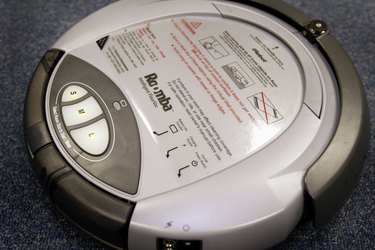
The Roomba is a robotic vacuum, made by iRobot. One of the most common issues users have with the Roomba is battery performance. Sometimes the battery seems to need replacing too soon; sometimes a charged battery depletes too soon into the cleaning cycle; sometimes batteries refuse to hold a charge. These problems can be caused by improper owner maintenance or by minor issues you can correct yourself. It is always best to try a few simple fixes before investing in a new battery. If these fixes don't work, call the Roomba support line at (877) 855-8593, or contact Roomba via their website's support center. If the problem seems to be the unit and it's under warranty, iRobot will replace it.
Charging Glitches
Video of the Day
Sometimes the charging process doesn't begin when it should. The problem may simply be that the battery is too hot. Allow the robot to cool after use, and then attempt to charge it again. Another charging problem occurs when the Roomba seems to be fully charged but shuts down shortly into the cleaning cycle. Try charging directly from the power supply instead of the home base. If it works, the issue might be with your Roomba's home base. If that fails, take your battery to a shop where it can be tested and recharged. If the problem persists after a test and recharge, the problem probably isn't with the battery.
Video of the Day
Power Light Doesn’t Illuminate
Sometimes users report that the power light on their robot won't illuminate. When this happens, the battery is usually dead or it's not seated properly in the robot. First, reinstall the battery. You will hear a click when it seats properly. If that doesn't fix it, try recharging the battery. If the power light isn't illuminating while the robot is sitting in the home base, verify that all the cords are connected tightly. If they are, try cleaning the metal charging contacts at the bottom of the robot with a soft cloth and a dab of window cleaner or alcohol.
Resetting the Roomba
Simply resetting the robot can fix many problems. To reset the battery, remove it, and then hold down the power button for 5 to 15 seconds. Reinstall the battery, and then plug in the charging cable. If your robot has a "clean" button instead of a power button, simultaneously hold down the "dock" and "spot" buttons for 10 seconds. Release the buttons, and charge the unit for 12 hours.
Draining, Then Charging
If the battery refuses to hold a charge, you may be able to revive it after draining it completely. Remove the robot's battery and set it aside for several minutes. Put the battery back in, then run the Roomba until the battery is completely discharged. Make sure the robot can't return to its home base during this use. When the battery is completely dead, charge it for 72 hours. Completely discharge the battery again, and repeat the process. If your robot is running longer than it did before, repeat the drain-then-charge exercise to get even more life out of the Roomba's battery. If this cycle doesn't keep the unit running longer, it's probably time for a new battery.
Extending Battery Life
The Roomba uses a rechargeable battery that lasts longer when used often. Use your robot on a regular basis and keep it charging between cleaning cycles. If you have a home base, keep the Roomba charging there between cleaning cycles. If not, keep the Roomba plugged in. Keep the home base on a hard, smooth surface, not on a thick carpet. The home base and Roomba should have space around them for ventilation. The home base should be in a cool, dry place and away from heat. You can also extend your robot's battery life by keeping its brushes clean. Dirty brushes are harder to spin and require more battery power. Once every few months, reset the Roomba and completely discharge the battery.